
Free Mac app turns Apple Silicon ports into USB-C cable testers
WhatCable reads USB-C cable and port data that macOS collects but does not show in its standard tools.
By Hana Yoshida · Markets Reporter
3 min read
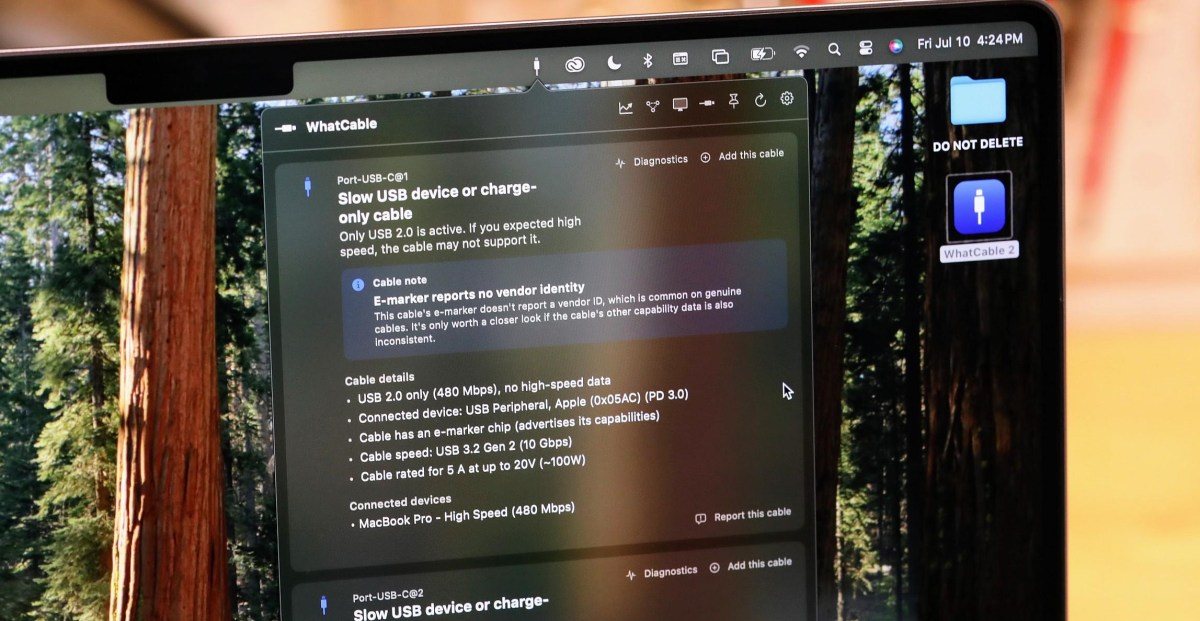
A free Mac utility called WhatCable can show Apple Silicon users what their USB-C cables and connected devices report about speed, charging and current connections. The tool matters because USB-C cables often look alike while supporting very different data and power capabilities.
The Verge’s Sean Hollister reported that the app sits in the macOS menu bar and displays information about attached USB-C cables and devices. According to WhatCable creator Darryl Morley, the app reads data already collected by Apple’s hardware and macOS rather than using special system access.
Morley told The Verge that Apple Silicon Macs include a port controller chip that handles USB Power Delivery negotiation. When a cable with an e-marker is attached, that controller requests identity data from the cable, including vendor ID, speed rating, current rating, voltage limits and whether the cable is active or passive, Morley said.
According to Morley, macOS stores that response in the IOKit registry, and WhatCable reads it through Apple’s public APIs. He said the app does not need root access or private entitlements because Apple’s firmware performs the negotiation and publishes the result, though standard macOS tools do not show it.
What the app can show
The Verge reported that WhatCable combines cable e-marker information with live details from the Mac and the connected device. Morley said that includes negotiated connection speed, Thunderbolt link speed, live voltage and current at each port, plus device identity and supported features.
That combination can help show whether a cable, device or Mac port is limiting performance, according to Morley. Hollister reported that the app identified a short Satechi cable as limited to USB 2.0 data at 480Mbps while still rated for 5 amps at up to 20 volts, or about 100 watts.
In another test, The Verge reported that a Supercalla cable whose e-marker claimed 10Gbps data and 100W charging did not perform that way on the Mac. WhatCable flagged the connection as slow or charge-only, and later showed repeated dropped connections, leading Hollister to conclude the cable appeared to be wearing out.
The app also identified a 240W USB4 cable as 40Gbps and Thunderbolt 4 class, according to The Verge. When paired with a fast SSD, WhatCable reported that the device was running at 10Gbps, and Hollister said a 25GB transfer took seconds rather than minutes.
Limits and pricing
The Verge reported that WhatCable is not a full substitute for hardware testing because cables can misreport their capabilities. In one example, a cable sold for 100W charging advertised only USB 2.0 speeds on Amazon, but its e-marker claimed 10Gbps USB 3.2 Gen 2; Hollister found the same 25GB transfer took minutes, and a separate hardware tester showed it did not support SuperSpeed.
Morley told The Verge that WhatCable will remain free at its core. A Pro version costs £9.99 and adds a real-time power monitor, diagnostics and a terminal view, according to the report.
Morley has also made WhatPort, a simpler app that monitors what each Mac USB-C port is doing, including power, data and video, The Verge reported. He told the publication that he does not expect to make a Windows version because of hardware variation and Windows API limits, and said Android and iOS do not provide enough low-level access. A Linux port is in development, and updates are posted on Morley’s GitHub page, according to The Verge.
This story draws on original reporting from The Verge.