
Google Earth brings its flight simulator to the web
Google has made Google Earth’s long-running flight simulator mode available in a browser, removing the need for the desktop app.
By James Whitfield · Staff Writer
2 min read
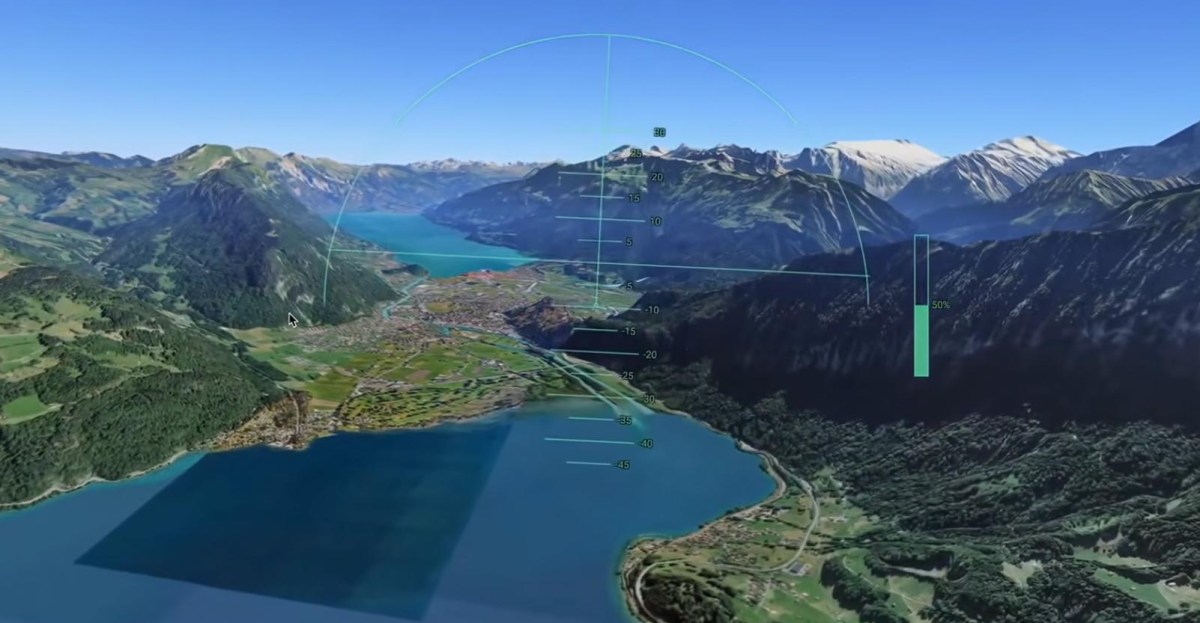
Google has made Google Earth’s flight simulator available through the web version of the service, giving more users access without installing the desktop app. The change matters for anyone who wants a quick, lightweight way to fly over Google Earth’s mapped terrain from a browser.
Google announced the web availability on Friday, according to a post from the Google Earth account on X. The Verge reported that the flight simulator had existed as a hidden feature in the desktop version of Google Earth since 2007.
Users can launch the mode by opening the Google Earth website, selecting the “Explore Earth” button near the upper-right side of the page, and then choosing “Flight Simulator” from the Tools section in the top menu bar, according to The Verge. The simulator appears as the final option in that Tools menu.
The browser version does not require a separate Google Earth download. That makes the feature easier to reach than the older desktop-only route, which kept the simulator out of sight for many casual users.
How to get a better view
The Verge said users may want to pick a location before starting a flight because the first loaded area can be an unremarkable stretch of ocean. For a more realistic-looking view, The Verge also recommends switching Google Earth’s basemap from Map to Satellite.
That setting uses satellite imagery rather than a simplified map style, which better suits a flight-simulator view. The experience is built around Google Earth’s global imagery rather than a dedicated flight-sim game world.
Controls and limits
Google has published a help page explaining how to control the aircraft with a keyboard or mouse. The Verge reported that the controls are not difficult to remember, though flying accurately can take practice.
The browser simulator is less complex and less realistic than dedicated games such as Microsoft Flight Simulator, according to The Verge. Even so, users still have to manage the aircraft carefully to avoid hitting terrain.
If the aircraft crashes, the simulator pauses and offers a reset option that returns the plane to a safe altitude, according to Google’s help documentation cited by The Verge. That gives users a way to restart quickly after a failed flight rather than reloading the whole experience.
Google has not described the web simulator as a replacement for full flight-simulation software. Based on Google’s rollout and The Verge’s testing, the feature is best understood as a browser-accessible way to explore Google Earth from the air.
This story draws on original reporting from The Verge.